
How Speaker Cleaner Tones Work
A browser-based speaker cleaner uses generated tones to move a speaker membrane. The goal is simple: help clear light water, loosen small debris, or reveal distortion through a controlled audio test.
The basic physics
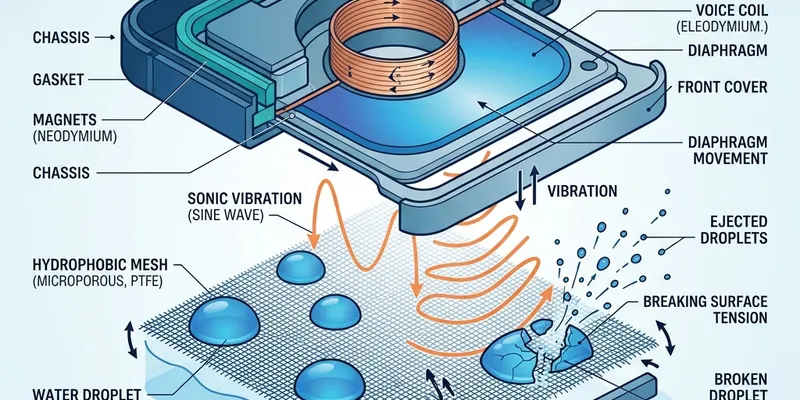
Speakers create sound by moving air. When water sits near a phone speaker grille, the same movement can help shake droplets toward the opening. This works best for small amounts of trapped water, not for liquid inside the phone body.
The Web Audio API generates precise sine wave tones at specific frequencies. The oscillator sweeps between a low and high frequency at a controlled rate, creating a "breathing" pattern that alternately pushes and pulls the speaker membrane.
Mode guide
- Water mode (150–185 Hz): tighter low-frequency sweep for droplets near the speaker grille. The narrow range creates consistent, focused pressure at the membrane.
- Dust mode (90–260 Hz): wider sweep for light debris and muffled output after pocket use. The broader range moves the membrane at more angles.
- Test mode (220–880 Hz): diagnostic sweep for crackle, dropouts, and volume checks. The wider range covers more of the audible spectrum.
- Ear Speaker mode (2000–4200 Hz): higher frequencies matched to earpiece drivers for call speaker cleaning. Works at lower volume to protect the smaller driver.
Why each page has a different job
Each main page has a separate purpose. The homepage is the tool hub. The water eject page is for moisture. The speaker cleaner page is for general dust and grille cleanup. The sound test page is for diagnosis. The channel test page checks left and right routing. The ear speaker page targets the earpiece.
Safe use limits
Short sessions at moderate volume are the safest default. Do not use loud tones while earbuds are in your ears, and do not keep running tones on a device that is hot, glitching, or recently submerged.
Technical details
The tool uses the Web Audio API, which is supported in all modern browsers. It creates an OscillatorNode connected to a GainNode for volume control. The frequency is swept using setTargetAtTime() for smooth transitions. No audio files are loaded — the sound is generated in real-time, which means zero download size and zero latency.
The vibration assist feature uses navigator.vibrate() to pulse the phone's haptic motor every 500ms during a session. This is supported on most Android browsers but not on iOS Safari.
अक्सर पूछे जाने वाले प्रश्न
Why do low frequencies help with water?
Low frequencies move the speaker membrane in a slower, wider motion. That vibration can help small droplets move toward the grille opening.
Why are there different modes?
Water, dust, ear speaker, and diagnosis need different tone behavior. Water mode uses a tighter low-frequency sweep, dust mode uses a wider sweep, ear speaker mode targets higher frequencies, and test mode uses a clearer diagnostic tone range.
Does the site record microphone audio?
No. The cleaner uses browser audio output only. It does not need microphone access and does not upload recordings.
What is the vibration assist feature?
When enabled, vibration assist uses your phone's vibration motor alongside the audio tone. The combined effect of sound vibration plus physical vibration can help dislodge stubborn debris. It uses the Web Vibration API and works on most Android devices.