
Sound Test
A diagnostic frequency sweep using a triangle wave to reveal crackle, dropouts, muffled spots, and weak frequency response in any speaker.
Empieza al 50% de volumen · escucha con atención
Diagnosing Audio Problems
Before you take your phone to a repair shop or attempt aggressive cleaning, you need to know exactly what is wrong with your speaker. Listening to music isn't a reliable way to test a speaker because music is complex, hiding subtle distortions behind layers of instruments and vocals.
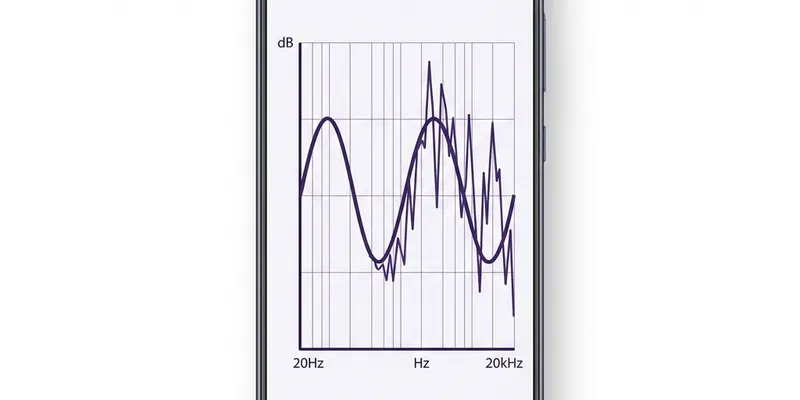
To truly test a speaker, you need a pure, continuous tone. The Sound Test tool uses a Triangle Wave sweep between 220 Hz and 880 Hz. Unlike a smooth sine wave, a triangle wave contains odd harmonics, making it sound slightly "buzzier." This specific texture is intentional: it is highly effective at vibrating loose components and revealing crackles or physical tears in the speaker cone that a smooth sine wave might miss.
How to Conduct a Proper Sound Test
Follow this diagnostic routine to accurately gauge your speaker's health:
Set your device volume to exactly 50%. Ensure the room is completely quiet. Disable any software EQ or Dolby Atmos settings.
Run the standard test for 30 seconds. The pitch should rise and fall smoothly without any grit, clicking, or stuttering.
Turn the volume up to 90% (avoid 100% to prevent software clipping). A healthy speaker should be loud but remain smooth.
Using the Slow Sweep Feature
By default, the Sound Test sweeps up and down the frequency range relatively quickly. This is good for a general health check. However, if you suspect a specific dead zone or a sympathetic vibration (where the phone casing vibrates annoyingly at a specific pitch), you need more precision.
Enable the Slow Sweep (Diagnostics) toggle in the tool above. This radically slows down the sweep rate and expands the range from 100 Hz all the way to 1000 Hz. As the tone slowly climbs, listen closely. If the audio suddenly drops out, gets incredibly quiet, or starts buzzing violently at one specific frequency, you've pinpointed a localized resonance issue or a damaged voice coil.
Hardware vs. Software Issues
A pure tone test helps isolate whether your problem is mechanical or digital:
- Mechanical/Hardware Damage: If the sweep produces a consistent, gritty crackle, especially as volume increases, or if there is a distinct buzzing noise rattling inside the phone, you are dealing with physical debris or a torn speaker cone.
- Software/DSP Issues: If the sweep sounds perfectly clean, but the volume randomly jumps up and down, or entirely mutes for a second and comes back, this is likely a software issue. Your phone's audio processing chip might be aggressively trying to compress the sound.
How to Interpret Your Sound Test Results
Listening to a sweeping frequency can tell you exactly what is physically wrong with your smartphone speaker. The key is to run the tool in a quiet room, hold the phone about 12 inches from your ear, and listen for specific anomalies as the pitch changes.
1. The "Buzz" or "Rattle" (Resonant Distortion)
If the tone sounds pure and smooth for most of the sweep, but suddenly buzzes or rattles violently at one very specific pitch (e.g., it sounds fine until it hits the middle of the sweep, rattles for a second, and then sounds fine again), you are experiencing sympathetic resonance.
This usually means something physical is loose. It could be a microscopic piece of hard debris (like a grain of sand) trapped against the speaker cone. At that specific frequency, the sound waves match the resonant frequency of the sand grain, causing it to vibrate violently against the plastic cone. It can also mean the waterproof adhesive holding the speaker module to the phone's frame has weakened, causing the entire module to rattle against the glass back of your phone.
2. The "Crackle" (Blown Speaker Cone)
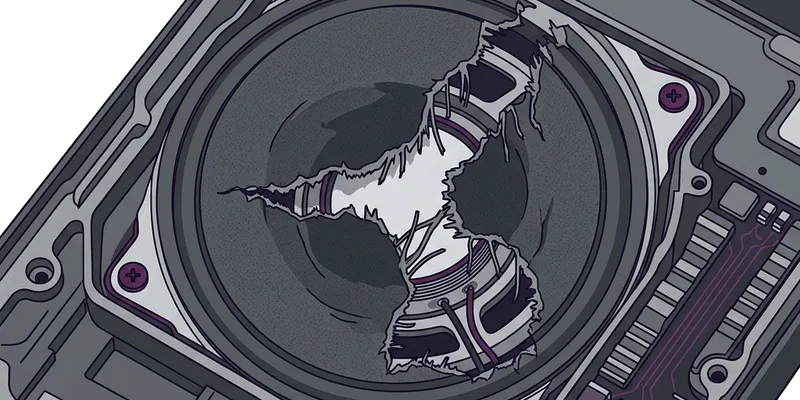
If the sound crackles continuously, especially when you turn the volume up past 70%, you likely have a blown speaker. A smartphone speaker cone is incredibly thin. If water pressure, compressed air, or an extreme physical drop tears a microscopic hole in this cone, it can no longer push air smoothly. Instead, the torn edges flap against each other wildly, creating a harsh, static-like crackle. This cannot be fixed with software or cleaning; the physical module must be replaced by a technician.
3. The "Muffled Drop" (Liquid or Dense Blockage)
If the tone suddenly drops in volume dramatically (sounding as if a pillow was thrown over it) but doesn't necessarily crackle, you have a physical blockage. This is the classic symptom of trapped water droplets or a dense pad of pocket lint. The speaker cone is trying to move, but a physical mass is absorbing the sound waves before they can exit the grille. If you hear this, you should immediately switch to our Water Eject or Dust Cleaner tools.
Testing Stereo Balance and Separation
Almost all modern premium smartphones (iPhone 11 and newer, Galaxy S10 and newer) feature a stereo speaker setup. This means they don't just have one speaker at the bottom; they use the top earpiece receiver as a second, weaker speaker to create a stereo effect.
When you run the Sound Test, the tone should sound like it is originating from the exact center of your phone screen. If the sound feels heavily weighted to the bottom, your top earpiece speaker is likely clogged with earwax or face oil (a very common issue). If the sound feels like it's entirely coming from the top earpiece, your primary bottom speaker is either blocked by water/lint or has completely failed.
You can further test this by running the Sound Test and physically covering the bottom speaker grille with your thumb. You should still clearly hear the high-pitched part of the sweep coming from the top earpiece. If you cover the bottom and hear absolute silence, your top speaker is dead or completely blocked.
Hardware Failure vs. Software Glitch
Before you pay $100 for a speaker replacement, you must rule out software bugs. Sometimes, an operating system update or a buggy Bluetooth connection can cause your phone's audio to distort, crackle, or drop to 10% volume, mimicking a hardware failure perfectly.
- The Bluetooth Trap: Ensure you are completely disconnected from all Bluetooth headphones, hearing aids, and car stereos. Sometimes a phone will route half its audio to a disconnected Bluetooth device, making the physical speaker sound broken.
- The Hard Reset: Perform a hard restart on your phone (usually holding the power and volume down buttons for 10 seconds). This clears the audio cache and resets the digital-to-analog converter (DAC) chips.
- Safe Mode: If you are on Android, boot into Safe Mode. This disables all third-party apps (like equalizers or volume boosters) that might be corrupting your audio stream.
If you have done all three of these things and the Sound Test tool still produces a crackle or a severe volume drop, you can be 100% certain it is a physical, hardware-level issue with the speaker grille or the cone itself.
Preguntas Frecuentes
Why do I hear crackling during the test?
Crackling usually means one of three things: loose debris is vibrating against the speaker cone, liquid is causing a short circuit, or the speaker membrane itself is physically torn (blown).
What does it mean if the sound completely drops out at certain frequencies?
Frequency dropouts often indicate software DSP (Digital Signal Processing) issues or heavy EQ settings. Try turning off any 'Audio Enhancers' or Dolby Atmos settings in your phone and test again.
Can this test fix a blown speaker?
No. A sound test is purely diagnostic. If the speaker membrane is torn from physical impact or extreme volume, it requires a hardware replacement from a repair shop.