
How to Remove Water From an iPhone Speaker
A wet iPhone speaker usually sounds quiet, buzzy, or muffled because water is sitting inside the grille. A controlled low-frequency tone can help move droplets out without opening the phone.
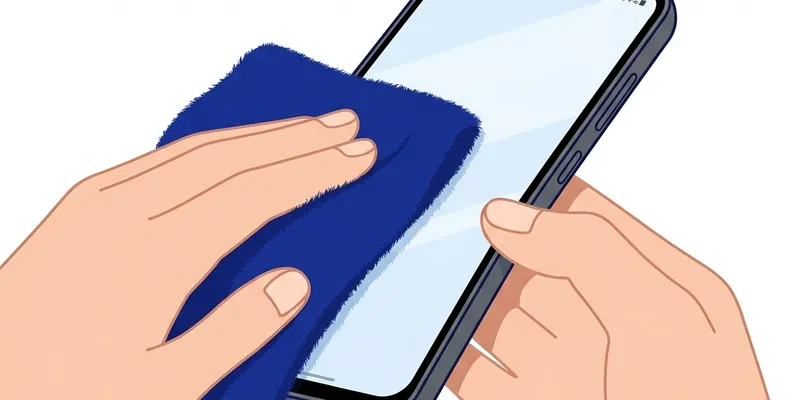
Start With the Safe Steps
Remove the case, unplug all cables, and hold the phone with the speaker grille facing downward.
Wipe the outside with a dry microfiber cloth. Do not push cotton, pins, or paper into the grille.
Run the water eject mode at medium volume first, then increase only if the sound is too weak to move droplets.
After the Tone
Tap the phone gently against your palm with the speaker facing down.
Let it rest in a dry room for at least 30 minutes. Avoid hair dryers, ovens, or direct heat.
If the sound is still distorted after several hours, moisture may be deeper inside and the phone should be checked by a repair professional.
When to Stop
Stop using tones if the phone heats up, the screen flickers, charging fails, or the speaker becomes sharply distorted.
A water eject sound can help with water near the speaker grille, but it cannot remove liquid from the logic board, charging port, or camera area.
What iPhone Models Are Most Vulnerable
All iPhones before the iPhone 7 lack an official IP rating and are significantly more susceptible to water damage. The iPhone 6s, iPhone SE first generation, and earlier models have no gaskets or adhesive seals around the speaker enclosure, so even a brief splash can reach internal components quickly. If you own one of these older devices, treat any water contact as an urgent situation.
The iPhone 7 through iPhone X carry an IP67 rating, meaning they can handle submersion in one meter of fresh water for up to 30 minutes under laboratory conditions. However, those seals degrade over time, especially after drops or screen repairs. A two-year-old iPhone 8 that has been dropped a few times likely has weaker seals than it did on day one.
iPhone 11 and later models improved to IP68, with Apple testing the iPhone 15 Pro at up to six meters for 30 minutes. Despite the higher rating, the bottom speaker grille is still an open path into the device. Salt water, chlorinated pool water, and soapy water are all more damaging than fresh water because dissolved minerals accelerate corrosion on internal contacts.
No IP rating is a permanent guarantee. Apple's own warranty does not cover liquid damage, and the Liquid Contact Indicators inside every iPhone will turn red if moisture reaches them. Even on the newest models, drying the speaker promptly after exposure is the safest course of action.
Common Mistakes That Make It Worse
The most common mistake is reaching for a hair dryer or heat gun. Concentrated heat above 60 degrees Celsius can warp adhesive seals, damage the OLED display, and even swell the battery. The speaker diaphragm itself is a thin polymer film that distorts permanently under high heat, turning a temporary water problem into a permanent hardware failure.
Pushing cotton swabs or toothpicks into the speaker grille is another frequent error. The iPhone speaker mesh is a fine stainless-steel weave bonded to the enclosure. Pressing a cotton fiber into it can leave lint behind that wicks moisture deeper, and a wooden toothpick can snag the mesh and pull it away from its frame.
Some guides recommend submerging the phone in dry rice. Rice does not actively pull water from enclosed spaces—it only absorbs ambient humidity slightly faster than open air. Worse, rice dust and starch particles can enter the speaker grille and charging port, creating a paste that hardens as it dries. Silica gel packets in a sealed container are a marginally better desiccant, but time in a dry, ventilated room remains the safest approach.
Finally, continuing to charge the phone while the speaker is still wet is risky. Moisture on the Lightning or USB-C contacts can cause short circuits, corrosion on the pins, or trigger the phone's moisture detection lockout. Wait until the phone is fully dry before reconnecting any cables.
When Professional Repair Is the Right Call
If the speaker still sounds distorted or crackly after 24 hours of drying and multiple water-eject sessions, the water has likely moved past the grille into the speaker enclosure or onto the flex cable that connects the speaker to the logic board. At this point, no amount of external drying will fix the problem, and a technician needs to open the device.
Visible corrosion on the charging port pins, a foggy camera lens that does not clear, or a screen with moisture bubbles underneath are all signs that water has penetrated beyond the speaker area. These symptoms often appear together because the same seals that protect the speaker also protect these other components.
Apple Stores and Apple Authorized Service Providers can run internal diagnostics that check each component individually. If only the speaker module is damaged, replacing it on an iPhone 12 through iPhone 15 typically costs between 70 and 100 US dollars out of warranty. Third-party repair shops may charge less, but make sure they use original or high-quality replacement speakers to preserve sound quality and waterproofing.
AppleCare Plus with theft and loss coverage does cover accidental damage, including water damage, with a service fee. If you have this plan, file the claim before attempting any third-party repair, because unauthorized disassembly can void AppleCare coverage entirely.