
Fix your speaker in seconds
Did your phone fall in water? Speaker sounds muffled? Fix My Speaker uses sound waves to push water and dust out of your phone speaker. Works on iPhone, Samsung, Android, AirPods, earbuds, and laptops.
Speaker facing down · 60% volume · 60 sec
Quick Takeaway
- Uses 150–260 Hz sound waves to clean speaker grilles
- Works on iPhone, Samsung, Xiaomi, OnePlus, Pixel, AirPods, and Bluetooth speakers
- No installation — runs in any browser on any device
- Fixes muffled sound, low volume, crackling, distortion, and weak bass
- Most users hear clear sound in 30 to 60 seconds
If your audio sounds muffled right now, run the tool above first. Then read the rest.
The right frequency for every problem
Each tool uses a different frequency range tuned to a specific speaker issue.
Pushes trapped water droplets out of the speaker grille using controlled low-frequency vibration. Same principle as Apple Watch water eject.
A wider frequency sweep to shake loose lint, pocket dust, and micro-debris from the speaker mesh. Best for phones older than 6 months.
Diagnostic sweep that reveals crackle, dropouts, muffled spots, and weak frequency response. Use this after cleaning to verify the fix.
Higher frequency matched to the tiny earpiece driver at the top of your phone. For muffled call audio and earwax buildup.
Sound-based speaker cleaning in 3 steps
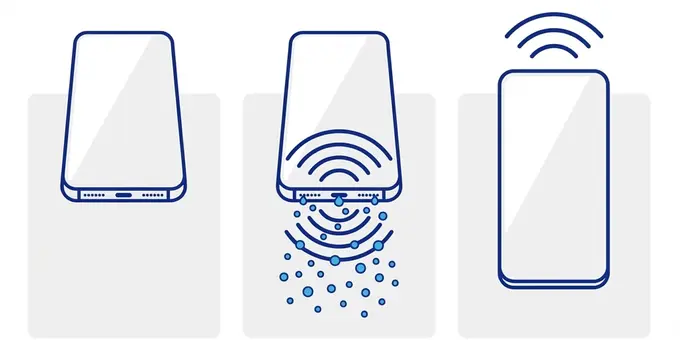
Remove your case and hold the speaker grille facing downward. Gravity helps water and debris fall out while the tone pushes from inside.
Pick the right mode — Water, Dust, or Ear — and press Start. Set volume to 60%. The tone vibrates the speaker membrane to break surface tension and shake debris loose.
Switch to Sound Test to check for improvement. If still muffled, wipe the grille with a dry cloth and run one more session. Most users hear clear sound after 1–2 cycles.
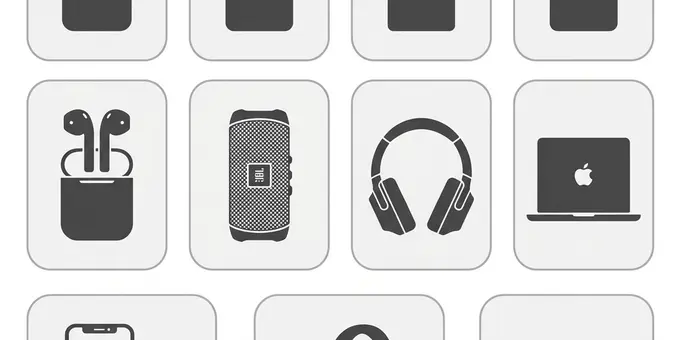
Compatible with every major device
The tool runs in your browser — it works on any device with a speaker.
Who should use Fix My Speaker?
Splashed phone at the pool or beach? Run Water Eject mode immediately — before salt and minerals dry inside the grille.
Sweat is just as bad as pool water. The salt residue builds up and blocks sound over weeks. Run the cleaner weekly after workouts.
Kids drop phones in sinks, toilets, and puddles. This tool is the fastest way to eject water before the speaker corrodes.
Face oil and earwax slowly block the earpiece. If calls sound muffled, the Ear Speaker mode cleans the top grille.
Lost bass? Quiet speakers? Months of pocket dust block the mesh and kill sound quality. A 60-second dust cycle brings clarity back.
Speaker repairs cost $30–$150. This free tool fixes 95%+ of muffled sound issues without opening your device or voiding warranty.
How sound-based cleaning works
When water enters a speaker grille, surface tension holds tiny droplets inside the mesh. These droplets block sound waves from leaving the speaker, causing muffled or quiet audio. Dust and lint create the same effect over months of daily use.
A low-frequency tone (150–260 Hz) played through the speaker vibrates the membrane at a rate that breaks this surface tension. Once the grip releases, gravity pulls the water out through the grille. The same vibration shakes loose dust and lint particles.
This is the same principle Apple uses in the Apple Watch Series 2+. When you end a swim, the Watch plays a specific tone to eject water from its speaker. Fix My Speaker applies this concept to all devices — phones, earbuds, laptops, and Bluetooth speakers.
Why are there different sounds for water vs dust?
Water and dust behave entirely differently on a microscopic level. Water is a cohesive fluid; it wants to stick together. A continuous, single low-frequency push (a pure sine wave around 165Hz) applies maximum physical pressure against the water droplet to blast it out as one big chunk.
Dust, lint, and sand, however, are made of thousands of independent, solid particles wedged tightly into the tiny gaps of your speaker mesh. A single frequency won't work because it only shakes the particles back and forth in one direction. To remove dust, you need a sweeping frequency (moving rapidly from 90Hz to 260Hz). This constantly changing pitch shakes the speaker membrane in hundreds of different geometric patterns, rattling the particles from every conceivable angle until they fall out.
Frequency ranges and what they target
| Frequency | Target | Best for |
|---|---|---|
| 150–185 Hz | Water droplets | Splashes, rain, sweat, toilet drops |
| 90–260 Hz | Dust and lint | Pocket debris, old buildup, sand |
| 220–880 Hz | Diagnostic | Finding crackle, weak spots, dead zones |
| 2000–4200 Hz | Earpiece | Earwax, face oil, lint in top grille |
Common mistakes that make it worse
Rice does not speed up drying. Starch dust gets into the speaker grille and charging port, causing more blockage. Use silica gel if you need passive drying.
Heat damages the battery, screen adhesive, and waterproof seals. It can also push moisture deeper inside. Air dry at room temperature only.
Charging a wet phone risks short circuits and corrosion. Wait until any moisture warning clears, or at least 48 hours after water exposure.
Pins, needles, and toothpicks push debris deeper and can puncture the mesh. Use a soft dry toothbrush instead — gently, from outside only.
Speaker care articles
How to Remove Water From an iPhone Speaker
Use a low-frequency water eject sound, gravity, and careful drying steps to clear water from an iPhone speaker.
How to Get Water Out of a Charging Port
A simple, device-safe drying routine for phones that show moisture warnings or refuse to charge.
Why Is My Phone Speaker Crackling?
Common causes of crackling phone audio, including water, dust, torn speaker mesh, software volume boosts, and failing hardware.
Why Does My Speaker Sound Muffled?
Diagnose muffled speaker audio and clear common causes like dust, water, blocked grilles, and mono audio settings.
How to Clean Earbuds Safely
Clean earbud mesh, silicone tips, and charging contacts without pushing debris deeper into the speaker opening.
Water Eject Sound for AirPods and Earbuds
Use short low-frequency bursts and careful drying to help remove water from small earbuds.
The Ultimate Guide to Smartphone Acoustic Health
Your smartphone is an engineering marvel, packed with delicate sensors and micro-components. Among these, the speakers are the most vulnerable. Why? Because unlike the battery, processor, or camera, speakers require a physical opening to the outside world to function. Sound waves need air to travel, meaning your device must have tiny holes in its armor. While modern devices are heavily shielded, these speaker grilles remain the Achilles' heel for water, dust, and debris.
The Evolution of Water-Resistant Phones (IP67 to IP68)
A decade ago, dropping your phone in the sink meant putting it in a bowl of rice and praying. Today, most flagship devices boast an IP67 or IP68 water resistance rating. But what do these numbers actually mean for your speakers?
The letters "IP" stand for Ingress Protection. The first digit (usually a 6) indicates absolute protection against solid dust particles. The second digit (7 or 8) dictates the level of liquid protection. An IP67 device can survive being submerged in 1 meter of fresh water for 30 minutes, while an IP68 device can handle deeper waters (up to 6 meters depending on the manufacturer) for the same duration.
However, there is a massive misunderstanding about how this waterproofing works. The interior motherboard and battery are protected by thick rubber gaskets and adhesives. The speaker, however, relies on a microscopic hydrophobic mesh. This mesh allows air (sound) to pass through while blocking liquid water molecules from entering the electronic cavity.
Here is the catch: The area outside this hydrophobic mesh—the tiny holes you actually see at the bottom of your phone—will still instantly flood with water. This "acoustic chamber" becomes a miniature swimming pool. The water doesn't ruin the electronics, but its sheer physical mass blocks the speaker cone from vibrating effectively. This is exactly why your music sounds hopelessly muffled after a dip in the pool. Our water eject sound tool solves this by using the speaker's own electromechanical force to blast that water out of the acoustic chamber, bypassing the surface tension that keeps it trapped.
Why the "Rice Trick" is Actively Destroying Your Phone
For years, the internet's favorite DIY solution for a wet phone has been to bury it in a bowl of uncooked rice. Let us be incredibly clear: Do not put your wet phone in rice.
Rice is mildly desiccant, meaning it does absorb ambient moisture in a sealed container over many days. However, it is not a magical vacuum that sucks water out of a speaker grille in a few hours. In reality, leaving your phone out in a room with a gentle fan blowing over it dries the device faster than burying it in rice.
Worse, rice is covered in fine, powdery starch. When you put a wet phone into a bag of rice, that starch dust enters the speaker grille, mixes with the trapped water, and forms a thick, glue-like paste. When this paste eventually dries, it turns into a concrete-like crust bonded directly to your speaker mesh. You have now permanently ruined your phone's acoustic capabilities, and the only solution is a hardware replacement. Fix My Speaker offers a safe, instant, sound-based alternative that removes the water without introducing foreign debris.
The Danger of Compressed Air (Canned Air)
When users notice their speakers are clogged with pocket lint or sand, they often reach for a can of compressed air. This is a fatal mistake.
The delicate membrane of a smartphone speaker is thinner than a human hair and is only designed to move a fraction of a millimeter. A blast of compressed air hits the speaker with over 60 PSI of force, instantly tearing the membrane or blowing it off its suspension. If you've used canned air and now your speaker crackles at high volumes, you have blown the speaker. We highly recommend using a sweeping frequency dust cleaner instead to safely shake debris loose.
How Fix My Speaker Operates (Amplitude vs Frequency)
Our tool works by manipulating two core properties of sound: Frequency (Pitch) and Amplitude (Volume). By precisely controlling these variables, we can trigger specific physical reactions in the acoustic chamber.
Measured in Hertz (Hz), this determines how many times per second the speaker membrane vibrates. Low frequencies (150Hz) move slowly but push a massive volume of air, making them perfect for moving heavy water droplets. High frequencies (3000Hz+) vibrate incredibly fast, which creates micro-fissures in dense, sticky materials like earwax (perfect for our ear speaker cleaner).
This dictates the excursion of the speaker—how far the membrane actually travels in and out. By keeping the volume high (but within the manufacturer's safe limit), we maximize the physical force applied to the blockage. You can verify the fix with our diagnostic sound test.
This is why Fix My Speaker is completely free and requires no app downloads. We utilize standard Web Audio APIs directly in your browser to generate mathematically perfect sine and triangle waves. It is an instant, universal solution for iPhone, Android, MacBook, and Bluetooth audio devices.
Frequently Asked Questions
Does a speaker cleaner sound really remove water?
Yes — a focused low-frequency tone (150–185 Hz) vibrates the speaker membrane, which physically pushes small water droplets toward the grille opening. This is the same principle used in the Apple Watch's built-in water eject feature. Most users hear clear sound within 30–60 seconds.
What volume should I use?
Start at medium volume (around 60%). Increase slightly if needed, but never run at maximum for extended periods. If you hear harsh distortion, lower the volume immediately. The vibration is effective even at moderate levels.
Can I use this with earbuds and AirPods?
Yes. Remove the earbuds from your ears first. Use the Water Eject mode for wet earbuds or the Ear Speaker mode for lint buildup. Keep sessions short (30 seconds). Works with AirPods, AirPods Pro, Galaxy Buds, Sony WF series, and all Bluetooth earbuds.
Will this fix a physically damaged speaker?
No. Sound-based cleaning works for moisture and loose debris only. If your speaker is cracked, corroded, or has a torn membrane, you'll need professional repair. The tool is safe and cannot cause further damage.
Is this tool really free?
Completely free — no download, no account, no ads, no premium tier. The tool runs entirely in your browser using the Web Audio API. It works offline after the first page load.
Which mode should I pick?
Water Eject (150–185 Hz) after splashes or rain. Dust Cleaner (90–260 Hz) for lint and pocket debris. Sound Test (220–880 Hz) to diagnose crackle or dropouts. Ear Speaker (2000–4200 Hz) for muffled call audio from the earpiece.
How often should I clean my speaker?
Once a month for normal use. Weekly if you exercise with your phone, live in a humid climate, or make frequent calls. Use it immediately after any water exposure for best results.
Does this void my warranty?
No. The tool plays a standard audio tone — the same kind your phone plays when listening to music. Nothing is installed, no hardware is modified, and no data is collected.