
Sound to Get Water Out of Phone: How It Works
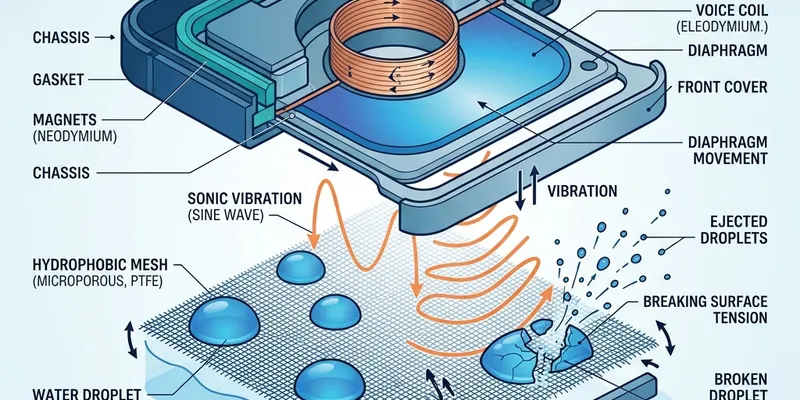
Water eject sounds work by oscillating the speaker diaphragm at low frequencies, physically pushing trapped water droplets away from the mesh and out of the speaker grille. The technique is the same physics that the Apple Watch uses in its built-in Water Lock feature.
The Physics Behind Water Eject Sounds
A phone speaker works by moving a thin diaphragm back and forth to create pressure waves in the air—this is how all speakers produce sound. When you play a low-frequency tone, the diaphragm moves farther in each cycle compared to high-frequency sounds. A tone at 165 Hz, commonly used in water eject tools, moves the diaphragm roughly 0.2 to 0.4 millimeters per cycle on a typical phone speaker. This displacement is enough to push water droplets that are sitting on or near the mesh.
Water clings to the speaker mesh through surface tension—the same force that makes water bead on a glass surface. The mesh holes on an iPhone speaker are approximately 0.1 millimeters in diameter, and surface tension is strong enough to hold small droplets in place against gravity alone. The vibration from a low-frequency tone disrupts this surface tension by accelerating the water faster than the adhesive forces can hold it, causing the droplets to detach and fall away.
The frequency matters. Tones between 100 and 300 Hz produce the largest diaphragm displacement on phone-sized speakers, making them the most effective range for water ejection. Below 100 Hz, most phone speakers cannot reproduce the tone with enough amplitude because the driver is too small. Above 300 Hz, the diaphragm displacement decreases rapidly, and the vibration is not strong enough to overcome surface tension on larger droplets.
Volume also matters, but more is not always better. Higher volume increases diaphragm displacement, which increases the force applied to water droplets. However, pushing the volume above 80 to 90 percent risks bottoming out the speaker—the diaphragm hits the physical limit of its travel and contacts the magnet or back plate. This can permanently crease the diaphragm or dislodge the voice coil. A volume of 60 to 75 percent provides the best balance of water-moving force and driver safety.
How to Use a Water Eject Sound Effectively
Remove the phone case to expose the full speaker grille. Hold the phone with the speaker facing directly downward so that gravity assists the ejection process. Water that is loosened by the vibration needs a clear path to exit, and gravity ensures it moves away from the phone rather than running across the screen or into the charging port.
Start the water eject tone at 50 percent volume and let it play for 15 seconds. During this time, you may see tiny droplets appear on the surface of the speaker grille or feel a slight mist if the phone is close to your hand. After 15 seconds, pause the tone and gently tap the bottom edge of the phone against your open palm two or three times to shake loose any remaining droplets.
Increase the volume to 70 percent and run a second 15-second session. This higher amplitude catches any remaining water that the first pass did not dislodge. After the second session, wipe the speaker grille with a dry microfiber cloth and set the phone down with the speaker facing down on a dry, clean surface. Let it rest for at least 30 minutes to allow any residual moisture to evaporate.
Repeat the process one more time if you can still hear muffled audio after the drying period. Most water exposure cases are resolved within two or three sessions. If the sound is still muffled after three full sessions with adequate drying time between them, the water has likely moved past the grille and into the speaker enclosure, where external vibration cannot reach it.
What the Apple Watch Water Lock Does Differently
The Apple Watch Water Lock feature, introduced with the Apple Watch Series 2 and watchOS 3, is the most well-known implementation of sound-based water ejection. When you activate Water Lock before swimming, the watch locks the screen to prevent accidental taps underwater. When you turn the Digital Crown to unlock afterward, the watch plays a series of tones that expel water from the single speaker port on the left side of the case.
The Apple Watch uses a sequence of tones rather than a single sustained frequency. The sequence starts at a lower frequency to move larger droplets, then shifts to higher frequencies to clear finer mist from the port edges. This multi-frequency approach is more effective than a single tone because different droplet sizes respond to different frequencies—larger droplets need lower frequencies with more displacement, while smaller droplets respond to higher frequencies.
Phone speakers are larger than the Apple Watch speaker, which means they can produce more displacement at low frequencies and are generally more effective at ejecting water per cycle. However, phone speaker grilles have more holes across a wider area, which means water can be trapped in more locations. The Apple Watch has a single small port, making ejection more focused and efficient.
You cannot directly trigger the Apple Watch water eject sequence on an iPhone because the feature is built into watchOS and uses hardware-specific calibration for the watch's speaker. Web-based tools and apps that provide water eject for phones achieve the same result using the same physics but with tones calibrated for the larger phone speaker driver.
Limitations and Safety Warnings
Water eject sounds can only remove water that is on or very near the speaker grille mesh. They cannot dry liquid that has entered the phone's interior through other paths—the charging port, the SIM tray, hairline cracks in the screen seal, or the barometric vent. If the phone was fully submerged, water eject may clear the speaker but will not address moisture on the logic board, battery, or display connectors.
Never use water eject tones on a phone that is visibly malfunctioning. If the screen is flickering, the phone is overheating, the touchscreen is registering phantom touches, or the phone is restarting on its own, power it off immediately and take it to a repair professional. Running a speaker tone on a phone with internal short circuits can increase current flow to damaged areas and accelerate corrosion.
Do not use water eject on a phone that is still actively wet on the screen or in the charging port. Vibrating the speaker while the phone is dripping can cause water to migrate into areas it has not yet reached. Wipe the phone dry externally first, then address the speaker grille specifically. The goal is to remove trapped water from one specific location, not to shake the entire phone while it is saturated.
Earbud and AirPod speakers are much smaller than phone speakers, and their maximum safe volume for water eject is lower—around 50 to 60 percent. The tiny balanced-armature and dynamic drivers in earbuds have less mechanical headroom, and pushing them to high amplitude at low frequencies can cause permanent distortion. Use shorter sessions of 10 to 15 seconds for earbuds compared to 15 to 30 seconds for phones.
Fresh Water vs Salt Water and Other Liquids
Fresh water is the easiest liquid to deal with because it evaporates cleanly and leaves no conductive residue. If your phone was splashed with tap water, a quick water eject session followed by 30 minutes of drying is usually sufficient. Tap water in most municipal systems does contain trace minerals, but the concentration is low enough that residue is negligible on speaker components.
Salt water—from the ocean, a saltwater pool, or sweat—is significantly more damaging. Sodium chloride is corrosive to metal contacts and conductive when dissolved, meaning it can create short-circuit paths on exposed electronics. If your phone was exposed to salt water, rinse the speaker grille gently with a small amount of fresh distilled water before running the water eject tone. This dilutes the salt before it dries into crystalline deposits on the mesh and diaphragm.
Chlorinated pool water falls between fresh water and salt water in terms of risk. Chlorine is a mild oxidizer that can degrade rubber seals and gaskets faster than plain water. After pool water exposure, rinse with distilled water and dry thoroughly. The chlorine itself evaporates quickly, but the calcium and other minerals present in most pool water can leave white deposits on the speaker mesh.
Sugary drinks, coffee, juice, and alcohol are the worst liquids for phone speakers. These substances leave sticky residues that bind to the speaker mesh and diaphragm, gluing dust particles in place and adding mass to the diaphragm that changes its resonant frequency. Water eject tones are least effective with sticky liquids because the vibration cannot overcome the adhesive bond. If your phone was exposed to a sugary drink, professional ultrasonic cleaning of the speaker assembly—with the phone opened—is the most reliable solution.
After the Water Is Gone: Testing Your Speaker
After completing the water eject process and allowing adequate drying time, test the speaker systematically rather than just playing a song and hoping it sounds right. Start with spoken-word content like a podcast or audiobook at 40 percent volume. Speech contains a wide range of frequencies from low vowels around 200 Hz to high consonants and sibilants above 4000 Hz, making it the best test material for detecting residual muffling or distortion.
Next, test at progressively higher volumes: 50 percent, 60 percent, 70 percent. Listen for distortion or crackling that appears only at higher volumes, which would indicate residual moisture that is not causing problems at low amplitude but interferes with the diaphragm at wider excursions. If the speaker sounds clean at 50 percent but crackles at 70 percent, another water eject session may help, or the phone may need more drying time.
Run a left-right stereo test to verify that both speakers are performing equally. Web-based speaker test tools can play a tone that alternates between the left and right channels. On a phone with stereo speakers, this means the tone should alternate between the bottom speaker and the earpiece. If one side is noticeably quieter or more distorted than the other, focus your next cleaning or drying effort on that specific speaker.
Finally, make a test phone call using speakerphone and have the other person confirm that your voice sounds clear to them. Water in the microphone port—which is separate from the speaker but often exposed during the same water event—can make your voice sound muffled or echoey to callers even though you hear them fine. If callers report audio quality issues, the microphone port may need the same gentle brushing treatment as the speaker grille.